Every missed call is a customer who may ring your competitor next. The phone system you choose decides how often that happens. Choosing the wrong one is also expensive to undo.
Here is the short answer. Hosted PBX suits most small, growing and multi-branch businesses. The provider runs the system, and you pay a monthly fee per user. An on-premise PABX suits businesses that want full control. It works best when your internal network is stable and you plan to use the system for many years.
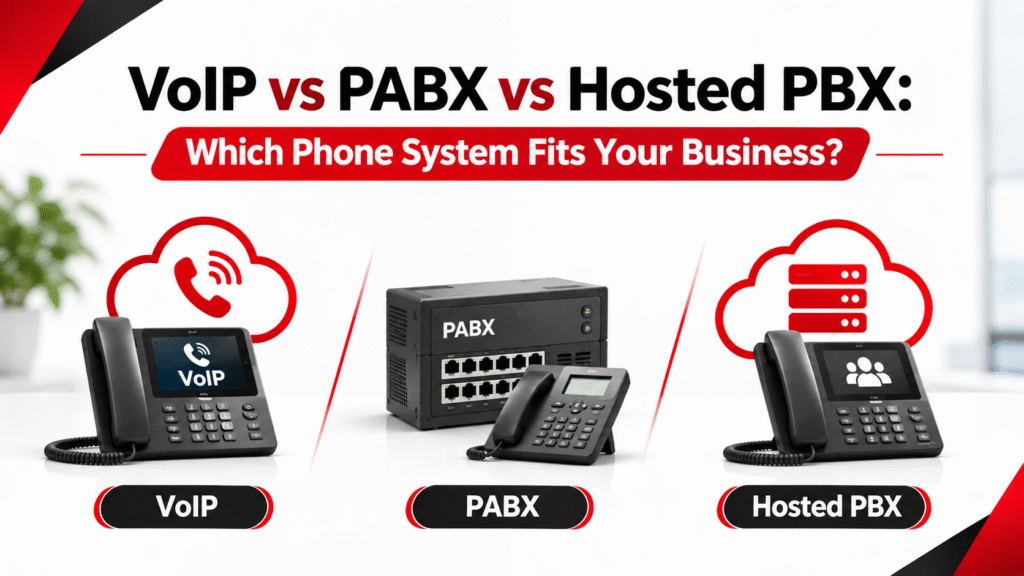
VoIP is not a third option. It is the technology that carries calls in modern versions of both. That point causes most of the confusion, so let’s clear it up first.
What Is the Difference Between VoIP, PABX and Hosted PBX?
VoIP stands for Voice over Internet Protocol. It sends voice calls as data over an IP network instead of traditional phone lines.
A PABX is a phone system inside your building. It connects your extensions to each other and to the outside world.
A hosted PBX does the same job. The difference is location. It runs in the provider’s data centre, and your phones reach it over the internet.
So the real question is not VoIP versus PABX. The real question is where the system lives and how calls reach it.
- On-premise PABX: the system sits in your office on hardware you own. It can be analog, digital or IP-based. Only the IP-based version uses VoIP.
- Hosted PBX: the system runs at the provider’s site. It always uses VoIP.
One more point on terms. Today there is no practical difference between PBX and PABX. The “A” stands for automatic. It dates back to the days of manual switchboards.
How Does a Traditional On-Premise PABX Work?
A traditional PABX is a hardware unit installed at your site. Desk phones connect to it through telephone cabling. It reaches the outside world through analog or digital lines from the telecom operator.
Its biggest strength is control. You own the equipment. Calls on telephone lines do not depend on your internet. It behaves predictably once it is set up.
The limits appear as your business grows. Adding extensions needs more ports, hardware or cabling. Features depend on what the unit supports. Remote working is hard. Upgrades usually need an engineer on site.
Many businesses do not need to replace a working analog system. A hybrid PABX keeps your existing lines and phones. It also adds IP capability, so you can move over gradually.
What Is a VoIP-Based (IP) PABX?
An IP PABX does the same job but handles calls as data. Phones plug into your office network through Ethernet. Many are powered through the same cable using PoE (Power over Ethernet). The PABX reaches the public phone network through a SIP trunk instead of physical phone lines.
This makes it more flexible. New extensions are added through configuration, not new wiring. Staff can use softphone apps on laptops or mobiles. Several branches can share one system. Calls can connect with other business software.
The trade-off is simple. Your network now carries your calls. Poor cabling or weak switches cause choppy audio and dropped calls. That is why a good PABX system installation starts with the network, not the handset.
What Is a Hosted PBX?
A hosted PBX moves the phone system out of your office. The provider runs it, maintains it and upgrades it. You use IP handsets or apps and pay a recurring fee, usually per user.
The appeal is simplicity. There is no PABX hardware to buy or house. Adding or removing users takes a few clicks. Staff in different offices, or at home, use the same system.
The compromises are clear. You pay every month. You have less room for customisation. You depend on both your internet connection and the provider’s service. You should also ask where call recordings and call data are stored. And check the exit terms if you change provider.
VoIP vs PABX vs Hosted PBX: Side-by-Side Comparison
| Traditional PABX | IP PABX (on-premise VoIP) | Hosted PBX | |
|---|---|---|---|
| Where the system runs | At your office | At your office | At the provider’s data centre |
| How calls connect | Analog or digital phone lines | SIP trunk over the internet or a private link | Provider’s platform over the internet |
| Upfront cost | Higher (hardware and cabling) | Higher (hardware, network, setup) | Lower |
| Ongoing cost | Line rental and maintenance | Trunk fees and maintenance | Recurring per-user fee |
| Adding users | Needs ports, hardware or cabling | Configuration, licences if required | Add users from an admin portal |
| Remote and hybrid staff | Difficult | Possible with softphones or VPN | Built for it |
| Control and customisation | High | High | Limited to the provider’s features |
| Dependence on internet | Low | High | High |
| Maintenance | You or your installer | You or your installer | Provider |
| Best suited to | Stable sites with simple needs | Larger sites and multi-branch businesses wanting control | Small, growing or distributed teams |
What Does a VoIP Phone System Need to Work Well?
Voice needs a steady connection more than a fast one. Three problems hurt call quality: latency (delay), jitter (uneven timing) and packet loss (missing data). A well-built network keeps all three low. A poorly built one does not.
Internet connection. A stable line matters most for hosted PBX and SIP trunks. Consider a backup connection from a second provider.
Cabling. IP phones need proper Ethernet cabling. Old telephone cable is often unsuitable. Every desk needs a tested data point for phones and computers.
Switches. Choose switches that supply PoE and can prioritise voice traffic. Many installers also place phones on a separate VLAN so voice stays clear of heavy data traffic.
Wi-Fi coverage. Staff using softphone or mobile apps depend on wireless. Weak coverage drops calls. A planned Wi-Fi installation in Dubai removes dead spots in meeting rooms and corridors.
Power. IP phones and hosted systems stop when the power stops. Put key switches and the PABX on a UPS.
Sefa’s team can run a free site survey and check your cabling, switches and Wi-Fi before you commit. Get expert advice before choosing your business phone system.
Is VoIP Legal for Businesses in the UAE?
Yes, when it is delivered through licensed channels. The UAE regulates VoIP, and the licensed telecom operators are e& and du. Business phone systems normally connect to the public network through SIP trunks or services from e& or du. A provider that works with them can also supply the service.
Voice calling on consumer apps such as WhatsApp or FaceTime is restricted in the UAE. It is not a replacement for a business phone system.
There is one notable exception. In its analysis of the TRA’s VoIP policy, law firm Hadef & Partners explains that VoIP used only inside an isolated closed group network falls outside the restriction. An example is a company’s own UAE offices that connect to no public network. That covers internal calls only. It does not cover calls to customers or suppliers.
Before you sign with any provider, ask how they are licensed and which operator carries your calls. Rules can change, so confirm the current position with the provider or the TDRA.
Which Features Matter in a Business Phone System?
Most business systems offer the same core features. The ones below are worth checking first.
- Auto-attendant (IVR): greets callers and routes them by menu.
- Call queues and ring groups: share incoming calls across a team.
- Voicemail to email: sends messages straight to your inbox.
- Call recording: useful for training and dispute handling.
- Mobile and desktop apps: let staff take office calls away from the desk.
- Call reports: show missed calls and busy periods.
- CRM integration: links calls to customer records.
Choose features by how your team handles calls. A longer feature list does not make a better system. A small team needs far fewer features than a busy call centre. Sizing the system to your staff is the first step when choosing a PABX system for small businesses. Feature sets also differ by brand and model, so confirm each one before you buy.
Can Your Phone System Work with Your Security Systems?
Often yes, depending on the equipment. A phone system is rarely the only system in a building. IP-based systems can share the same network as other low-voltage systems.
A PABX can often work alongside a public address system for paging and announcements. It can also link with intercoms and door entry. Access control and intruder alarms often run on the same network too. So does CCTV installation in Dubai work for offices, shops and villas.
Planning them together saves effort. You avoid repeated cabling runs and clashing network settings. Compatibility depends on the brands and models, so check it at the design stage, not after installation.
How Do You Secure a VoIP or IP PABX System?
Phone systems are a target. A common risk is toll fraud, where attackers use your system to place expensive international or premium-rate calls. You pay the bill.
These steps reduce the risk:
- Change every default admin password.
- Use strong, unique passwords for extensions.
- Limit international and premium-rate dialling to staff who need it.
- Keep firmware and software up to date.
- Keep voice traffic on its own VLAN.
- Do not expose the admin panel to the open internet.
- Review call logs for unusual activity.
Ask your installer or provider to confirm each of these at handover.
What Does a Business Phone System Cost?
Costs vary by provider and site, so this section covers what to budget for, not prices.
For an on-premise PABX, plan for:
- The PABX unit or server, and licences
- Handsets
- Cabling and network upgrades
- Installation and configuration
- Line or SIP trunk fees
- Ongoing maintenance
For a hosted PBX, plan for:
- Monthly per-user fees
- Handsets or app licences
- Network upgrades, if your network needs them
- Setup fees
- Call charges
- Contract length and exit terms
Compare total cost over three to five years, not the first-year price. Hosted costs less to start but is paid every month. On-premise costs more upfront and then mainly maintenance. A large team using the system for many years can end up paying more for hosted than for an owned system. A small team may not.
How Do You Move from an Old PABX to IP Telephony?
A planned migration avoids downtime. Most businesses follow these steps:
- Audit the current system. List lines, extensions and the features your team really uses.
- Survey the site. Check cabling, switches, Wi-Fi coverage and power backup.
- Choose the model. Decide between hybrid, IP PABX and hosted, and confirm the licensed carrier.
- Fix network gaps first. Arrange structured cabling installation, PoE switches or a UPS where needed.
- Install and test. Configure the system and trial it with a small group.
- Switch over in stages. Keep the old lines active until the new setup is stable.
- Train staff and document. Share extension lists, call routing and who to call for support.
Which Phone System Fits Your Business?
The right choice depends on your size, your sites, your network and how your team works.
- Small office, no in-house IT: hosted PBX is usually the simplest route.
- Small office with good cabling: a compact IP PABX also works. Size it to your staff and avoid buying more than you need.
- Growing company or several branches: hosted PBX is easier to roll out. An IP PABX with SIP trunks suits you if you want to own and control the system.
- Remote or hybrid teams: hosted PBX is the most straightforward. An IP PABX can do it, but needs softphone and remote access set up properly.
- Hotels, hospitals, factories and large campuses: an on-premise IP or hybrid PABX is often the better fit. This is especially true when calls must work with paging, intercoms or other on-site systems.
- Unreliable internet, or calls that must survive outages: choose an on-premise PABX with some analog or digital lines, or a hybrid system.
- An analog PABX that still works: weigh up an analog PABX setup vs hybrid PABX system before replacing anything. A hybrid upgrade is often more sensible than a full replacement.
Tell us how many staff and branches you have, along with your current phone setup. Our team can recommend a suitable option and provide an installation quote.
Common Mistakes to Avoid
- Buying handsets before checking the network. Weak cabling or switches are the most common hidden cost.
- Ignoring licensing. Confirm how your provider is licensed in the UAE.
- Comparing first-year price only. Look at three to five years.
- Having no outage plan. Decide how calls will reach you if the internet or power fails.
- Paying for features nobody uses. Match features to real call handling.
- Skipping the contract details. Check notice periods, number ownership and where recordings are stored.
- Skipping training. A good system still fails if staff do not know how to use it.
Frequently Asked Questions
Can I keep my existing analog lines and phones?
Often yes. A hybrid PABX supports analog or digital lines alongside IP phones. You can move to IP gradually instead of replacing everything at once.
Does a hosted PBX work if the internet goes down?
Not on its own. Calls travel over your internet connection, so an outage affects them. A backup connection reduces the risk. Also agree a failover plan with the provider, such as routing calls to mobile numbers.
Do I need new cabling for IP phones?
Usually you need proper Ethernet cabling to each desk. Old telephone cabling often cannot carry IP traffic reliably. A site check shows what you can reuse and what needs replacing.
Choosing the Right System
Choose a hosted PBX when you want low upfront cost, quick setup and support for remote staff. Choose an on-premise IP or hybrid PABX when you need control, closer integration with on-site systems, or calls that do not depend entirely on the internet.
In both cases, check the cabling, the internet connection and the licensing before you commit.
SEFA has delivered SIRA-approved ELV systems in Dubai since 2003. Get help planning or installing a PABX system and the network behind it. We also offer maintenance and annual maintenance contract (AMC) options.
Explore our PABX system installation in Dubai service to learn more.